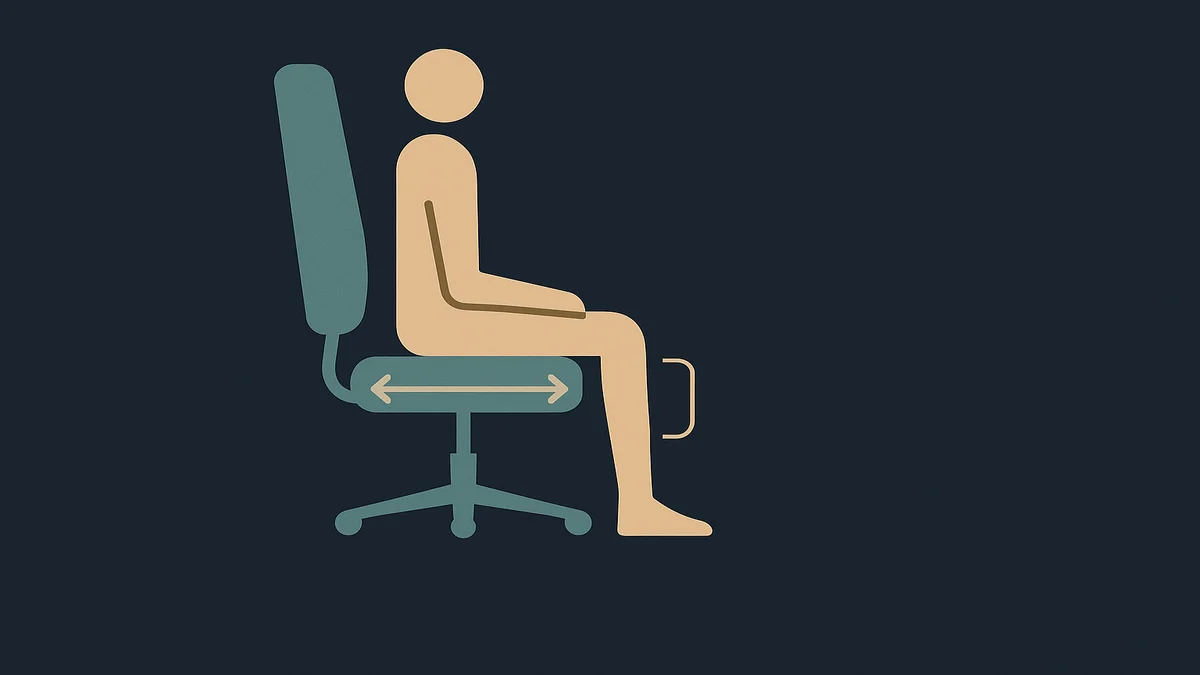
Office chair seat depth is the distance from the backrest to the seat’s front edge, and the target is a 2 to 4 inch gap between your knees and the seat edge when you sit fully back. Too deep and the seat presses your knees; too shallow and your thighs lose support. Virginia Tech’s ergonomics program uses that same gap.
Seat depth is the least-known chair adjustment and the one with the most visible symptoms. When it is wrong, your body negotiates with the chair in ways you can watch: people with seats too deep slide forward to the front edge to free their knees, which abandons the backrest entirely, or they perch with their feet wrapped around the chair base. Virginia Tech’s ergonomics program describes exactly that chain: a seat pan that is too long touches the back of your knees, so you scoot forward to create the gap, and in doing so you lose back support and take on a higher risk of a slouching posture.
The symptoms show up in a daily rhythm worth noticing. Too-deep seats announce themselves late in the day, when the knee crease has taken hours of pressure and you start repositioning every few minutes without deciding to. Too-shallow seats announce themselves earlier, as the feeling that the chair was built for someone with shorter legs, because your thighs are half-supported and the backrest ends up too far away to reach honestly. Both are fit complaints, not quality complaints, which is why the same chair earns five-star reviews from one body and returns from another.
The term you will see in spec sheets is “seat pan,” which is just the seat surface itself, the part you sit on, as distinct from the backrest. Depth adjustment moves the seat pan forward or back relative to the backrest, either with a lever (seat-slider) or by changing where the backrest mounts. On chairs without it, seat depth is fixed at whatever the manufacturer guessed for an average user, which is why the same chair can be comfortable for one colleague and unbearable for another.
One mechanism to keep in mind before the how-to: the back of your knee is not just skin. Nerves and blood vessels run through that area, and a seat edge pressing there for hours creates the numbness and circulation complaints that show up as “my feet fall asleep at my desk.” That is a mechanical pressure problem, and it is also why good chairs have a rounded, waterfall-style front edge rather than a hard square one, a detail OSHA’s chair guidance calls out directly.
Why office chair seat depth matters for remote workers
The stakes are posture first, circulation second, and both are worse at home than in an office.
The posture mechanism is the forward slide. When the seat is too deep, the body solves the problem by moving, and the only direction available is forward and away from the backrest. You end up sitting on the front third of the seat with nothing behind your lumbar region, which rounds your lower back and shifts your whole upper body ahead of your hips. That is the slouch that no amount of lumbar support fixes, because the support is physically behind you. Virginia Tech’s guidance treats the forward slide as predictable enough to use as a diagnostic: if you sit at the front edge with no back support, the seat pan is probably too long.
The circulation mechanism is the opposite case. A seat edge that presses into the back of the thigh restricts blood flow to the lower leg, and the symptoms are the familiar ones: numb feet, heavy legs, the need to keep shifting. OSHA’s seat guidance lists restricted circulation, swelling, and numbness among the outcomes of badly fitted seat geometry, and while a seat is rarely the only cause of those symptoms, a front edge digging into your thighs is a mechanical pressure you can actually remove.
Remote work adds a purchasing problem the office never had. Office chairs get assigned by a facilities team that can measure and adjust; your home chair was probably bought online, untried, and sits in whatever depth it shipped with. Seat depth is also the adjustment most often missing on budget chairs, which means the chair you bought for your home office may be structurally incapable of fitting your legs. That makes seat depth a purchase-time decision, not just a setup-time one: if you are buying, check that the depth is adjustable or that the seat depth suits your height, before you check anything about mesh versus foam.
There is no medical claim to make here, only a mechanical one. Persistent numbness, tingling, or leg pain that does not resolve with position changes belongs with a clinician, because circulation and nerve symptoms have causes a chair cannot fix.
How to apply it
Test your current seat in 60 seconds
Sit all the way back, hips against the backrest, feet flat on the floor. Reach down: if you can fit two to four fingers between the back of your knee and the seat edge, the depth fits. If your fingers do not fit, the seat is too deep; if your knees hang well past the edge with the thigh unsupported, it is too shallow. That is the whole test, and it is the same one the university ergonomics programs use.
Adjust it, if your chair allows
Most seat-slider mechanisms work the same way: a lever under the right side of the seat releases the pan, which then slides forward or back. The sequence:
Release the slider and push the seat pan forward or back until the 2 to 4 inch gap appears when you sit fully back.
Lock the slider and stand up, then sit back down and re-test, because the pan can shift while locking.
Check the seat height at the same time. Depth and height interact: if you fix the depth and the seat is suddenly too high or too low, fix the height before judging the fit. Our guide on office chair seat height covers that adjustment.
Check the front edge. A waterfall (rounded) edge spreads the pressure; a hard square edge concentrates it at the knee crease. If your seat edge is square and the gap is at the minimum end, keep those two fingers of clearance rather than trusting the edge to be kind.
Fixes when the chair cannot adjust
Seat too deep, no slider. The first option is a footrest, and OSHA’s seat guidance explicitly recommends one when the seat cannot be lowered to fit: stable foot support changes where your legs rest and can relieve the knee pressure. It is a partial fix; the seat still supports less of your thigh than it should. A thin wedge cushion placed behind you to sit further forward is the commoner improvisation, but it moves and compresses, and I would treat it as a stopgap rather than a solution.
Seat too shallow. There is no cushion that fixes a seat that does not reach your thighs; the backrest ends up in the wrong place the moment you sit fully back. This is a chair-fit failure, not an adjustment failure.
Either case, persistently. Virginia Tech’s guidance puts it plainly: if the seat pan is not adjustable and the front edge contacts the back of your knees, consider replacing the chair. When that is the conclusion, the best office chairs guide filters for seat-depth adjustability among its criteria, and the wider set of chair fit decisions lives in the ergonomics guides on the site.
The sitting habit that makes seat depth work
Seat depth only pays off if you sit fully back, and the honest way to get there is to make it easy rather than to police yourself. Sit down by backing in until your hips touch the backrest, then set the depth around that position. If you find yourself on the front edge again by lunchtime, re-run the finger test: what changed is usually the seat height or the chair’s position relative to the desk, not your discipline. Movement matters too; getting out of the chair several times an hour, as Virginia Tech’s ergonomics guidance recommends, does more for your legs than any seat setting.
Related guides and tools
The office chair ergonomics hub collects the full adjustment set; seat depth is one of five, and they only work as a set.
Office chair seat height interacts with seat depth more than any other adjustment; fix height first, then depth.
The home office hub is the parent guide for the whole workspace, including desk height, which is the other half of the geometry your legs
live in.
Leg numbness at your desk is not always the chair’s fault; how your hand rests all day matters too, which is the territory of the best mouse for work guide.
Frequently asked questions
What is office chair seat depth?
It is the horizontal distance from the backrest to the front edge of the seat, sometimes called seat pan depth. It determines how much of your thigh the seat supports and how much clearance the back of your knees gets. The working target is a 2 to 4 inch gap between knee and seat edge while sitting fully back, per university ergonomics guidance.
How do I get started with office chair seat depth?
Sit all the way back with hips against the backrest and feet flat, then check for the 2 to 4 inch finger gap at the back of your knees. If the chair has a seat-slider lever under the seat, release it, slide the pan to create the gap, lock it, and re-test. If the seat does not adjust and the edge presses your knees, plan a replacement instead of compensating with posture.
What are common mistakes with office chair seat depth?
Judging depth while perched forward instead of sitting fully back; fixing depth without rechecking seat height afterward; padding a too-deep seat with a thick cushion that slides; assuming a chair without a seat slider can be fitted anyway; and ignoring the front edge shape, since a hard square edge concentrates pressure at the knee crease even when the gap is technically correct. Persistent numbness is a clinician question, not a cushion question.