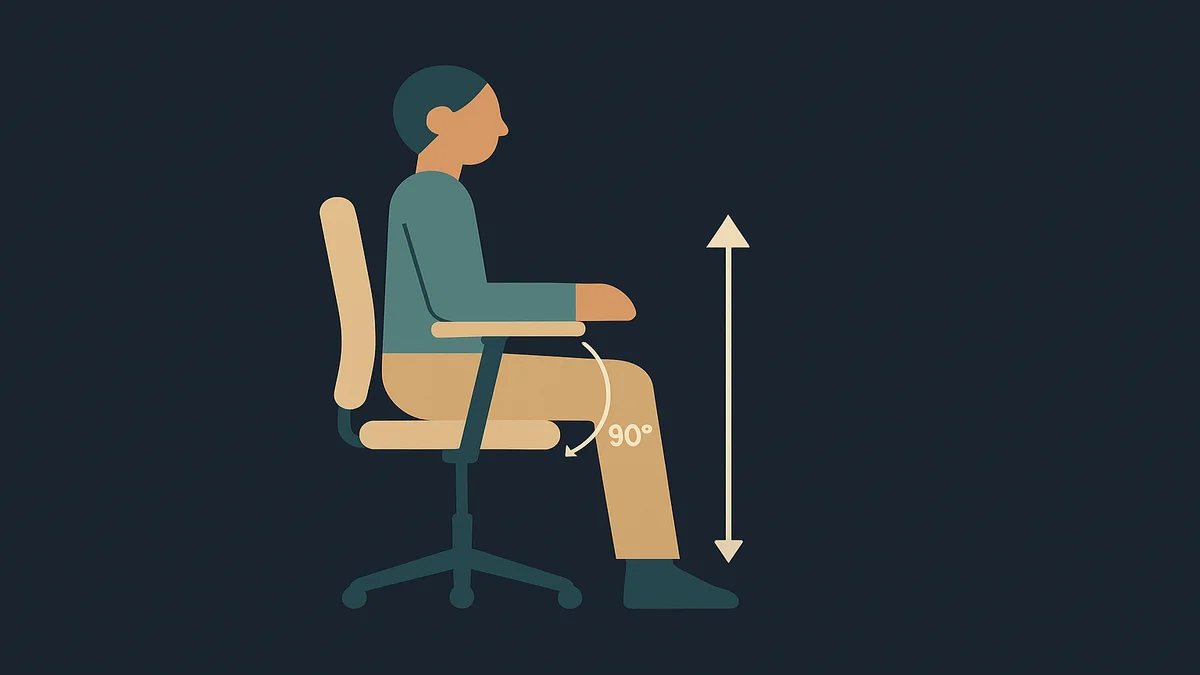
Correct armrest height puts the arm pads just under your relaxed elbows, so your shoulders stay down and loose while your forearms rest lightly on the pads. The test: let your arms hang, then raise the armrests until they just contact your forearms, no higher. OSHA’s guidance says it plainly: armrests should be low enough that shoulders stay relaxed.
The reference point is your body, not the chair. Armrest height is set relative to your elbow height while seated, which changes with your seat height, your desk height, and your proportions. That is why a chair that fits your colleague can be wrong for you even with the same model, and why armrest height is an adjustment rather than a fixed feature worth having.
The symptom of too high is unmistakable once you know it: shoulders held up toward the ears, because the pads prop your forearms at a height your relaxed shoulders cannot reach. The symptom of too low is subtler: your shoulders droop or your torso leans to one side so an arm can find the pad, which OSHA’s armrest guidance flags as a cause of uneven, awkward postures that fatigue the neck, shoulders, and back.
Armrests are also the most argued-about adjustment in ergonomics, and the argument is worth stating honestly rather than papering over. Cornell’s ergonomics guidance takes the skeptical view: armrests help for getting in and out of the chair and for occasional resting, but resting forearms on them constantly while typing or mousing can compress the forearm muscles, and some pads press on the ulnar nerve at the elbow. OSHA’s guidance takes the other side: properly adjusted armrests support the lower arms while the upper arms stay close to the body. Both can be true, because they describe different uses: support for your arms at rest and during breaks is uncontroversial; whether to type with forearms planted on the pads is a matter of fit, pad shape, and what your wrists and neck do as a result. I would treat that as a test-it-yourself question, and the rest of this guide gives you the setup that makes the test meaningful.
Why correct armrest height matters for remote workers
Armrest height is a load-bearing detail for the upper body, and remote work changes the stakes in three ways.
First, the mechanism: your arms are heavy, and something has to hold them up. Relaxed at your sides, your forearms still weigh enough that holding them hovering over a keyboard all day fatigues the shoulders and upper back. OSHA’s guidance describes the failure cases in detail: armrests too high hold the shoulders raised, which creates muscle tension and fatigue in the neck and shoulders; armrests too low cause leaning to rest a forearm, which fatigues the neck, shoulders, and back unevenly. Either way the cost lands in the same places, and it accumulates across the hours you spend at the desk rather than announcing itself on day one.
Second, the remote-work desk problem. Office chairs are fitted to desks with keyboard trays and IT-managed monitor heights. Your home desk is whatever you bought, probably a fixed-height table, and your keyboard sits directly on it. In that geometry, armrest height decides how your arms meet the desk: pads set right can take part of the forearm load while you type and mouse; pads set wrong either fight the desk edge or tempt you to plant your elbows on them for hours. Getting the height right is also what keeps your wrists straight while you work, which is the precondition for most of the other wrist and hand advice out there.
Third, home chairs are shared and repurposed. The chair may serve your workday, a partner’s evening gaming session, and a kid’s homework, with armrests left wherever the last person set them. A fixed correct height does not exist in a shared chair, which is one more argument for height-adjustable armrests at purchase time, and for a 30-second reset each morning.
Fourth, and worth naming because it is the failure I see most in home setups: the armrests get used as a shelf for everything the desk does not hold. Phone, coffee, notebooks, the forearm of doom scrolling a second screen. Every one of those loads the pads and your shoulder line differently than the setting was built for, and the phone-in-particular is worth flagging: hours of elbow-propped phone scrolling on an armrest is its own repetitive load, independent of how well you type. If your armrest height is correct and your shoulder still complains by evening, check what you are actually doing on the pads between meetings, not just during them.
The usual boundary applies and I will keep it short: badly adjusted armrests contribute to neck, shoulder, and elbow discomfort by mechanics, not by diagnosis. Persistent pain, tingling, or numbness in arms or hands is a clinician conversation. OSHA’s own guidance also includes a blunt fallback worth knowing: if your armrests cannot be properly adjusted or interfere with your workstation, remove them or stop using them. An armrest is a tool, not an obligation.
How to apply it
Set the height in one minute
Sit all the way back in the chair, feet flat, shoulders relaxed and down. Nothing else you adjust on the chair should be done with hunched shoulders.
Let your arms hang at your sides, elbows bent roughly 90 degrees as if resting on the pads.
Raise each armrest (usually a button or ratchet on the side of the pad) until the pad just touches the underside of your forearm at elbow level.
Stop there. Contact, not lift. If your shoulders rise to meet the pads, drop the height a notch and re-test.
Check against the desk: your forearms should reach the keyboard with your shoulders still down. Virginia Tech’s ergonomics guidance adds the useful cross-check that armrests should sit slightly below your elbows and that the height must not interfere with using your keyboard and mouse.
The whole sequence is two adjustments if the armrests are 4D (height, width, depth, and pivot), one if they are height-only, and zero if they are fixed, which changes what step six looks like.
Check the other dimensions
Height is the headline adjustment, but three more decide whether the height even works:
Width. Pads too far out make you reach sideways with the elbows, which pulls the arms away from your body and fatigues the shoulders, another item from OSHA’s list. Set them close enough that your upper arms stay at your sides.
Depth. Pads should support the forearm, not the elbow point itself. Slide them back so contact lands on the fleshy part of your forearm.
Pad material and shape. Hard pads with sharp corners can irritate the nerves and blood vessels in the forearm, per OSHA’s guidance, which is the mechanism behind the “my hands tingle on the armrests” complaint. Broad, flat, padded pads are the safer shape; Cornell’s guidance makes the same recommendation.
Fit the armrests to the desk, not the reverse
Armrest height is the adjustment that connects the chair to the desk, so set them together:
Set seat height so your feet rest flat and your hips sit slightly higher than your knees.
Set armrest height so contact lands just under your relaxed elbows.
Then check the desk: forearms level with the desk surface means the chair and desk agree. If your forearms angle up to the keyboard, the desk is too high relative to the chair, and the honest fixes are a keyboard tray, a lower desk, or (last resort) raising the chair and adding a footrest, which our guide on office chair seat height covers.
During typing and mousing, test both ways: forearms lightly on the pads versus hovering. Whichever keeps your shoulders down and wrists straight wins; that is the fit question the ergonomics sources disagree on, and your body is the tiebreaker.
If the chair’s armrests are fixed at the wrong height and they interfere with the desk, the OSHA fallback is the answer: remove them or leave them unused. When you are choosing a replacement instead, treat armrest adjustability as a purchase criterion, and our best office chairs guide sorts options by exactly that kind of adjustment set; the office chair ergonomics hub holds the rest of the fit adjustments that work alongside this one.
Related guides and tools
The office chair ergonomics hub is the parent guide for the full adjustment set; armrest height interacts with every other one.
Office chair seat height comes first in the fitting sequence, because armrest height is set relative to wherever the seat ends up.
The home office hub covers the desk side of the chair-to-desk geom
etry this guide keeps bumping into.
Armrests support the arms; what your hand does after it leaves the pad is its own topic, covered in the best mouse for work guide.
Frequently asked questions
What is correct armrest height?
Correct armrest height means the pads sit just under your relaxed elbows, low enough that your shoulders stay down and loose, high enough that your forearms get real support. OSHA’s guidance describes it as contact with your lower arms when they are positioned comfortably at your sides. If your shoulders rise to meet the pads, or you lean sideways to reach one, the height is wrong.
How do I get started with correct armrest height?
Sit fully back with feet flat and shoulders relaxed, then let your arms hang and raise the armrests until each pad just touches the underside of your forearm. Stop at contact, not lift. Then check the desk: your forearms should reach the keyboard with shoulders still down. If the armrests are fixed or the height fights the desk, remove them or stop using them per OSHA’s fallback.
What are common mistakes with correct armrest height?
Setting pads to prop the shoulders up, which creates neck and shoulder tension; leaving them so low that you lean to one side; resting the elbow point instead of the forearm on the pad; setting width so the elbows reach outward; and typing for hours with forearms planted on hard pads that press the ulnar nerve at the elbow. The quietest mistake: never adjusting them at all, on the assumption the factory setting fits.
Sources used
OSHA, Computer Workstations eTool, Chairs component (armrest potential hazards: too high, too low, too wide, too close, hard materials; solutions: contact at relaxed sides, shoulders relaxed, removal fallback): https://www.osha.gov/etools/computer-workstations/components/chairs